
Installing LED strip lights in aluminum channels is one of the most reliable ways to achieve a clean, professional lighting finish. The channel protects the strip, improves heat dissipation, and creates a smoother light output when paired with the correct diffuser. It also makes installation easier to standardize in cabinets, shelves, ceilings, display fixtures, and architectural lines where exposed LED tape would look unfinished.
This guide explains how to install LED strip lights in aluminum channels step by step, including planning, cutting, wiring, mounting, diffuser selection, and troubleshooting. It focuses on practical details that affect performance and long-term stability. You can explore KOGEE options on our LED aluminium profiles collection.
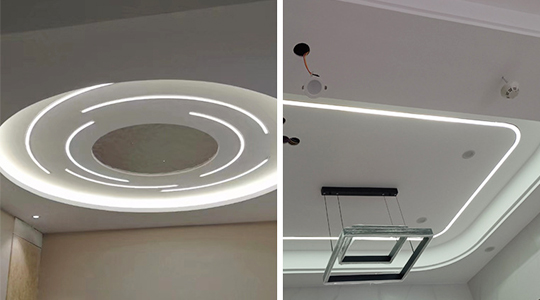
An LED strip produces heat and is sensitive to dust, moisture, and handling damage. An aluminum channel acts as a stable mounting structure and a heat-spreading body. When the strip is bonded properly to aluminum, heat transfers away from the LED chips more efficiently than mounting directly to wood, paint, or plastic surfaces. Lower operating temperature helps reduce brightness drop over time and supports longer strip lifespan.
A channel also provides a clean mechanical edge that hides wiring and protects the strip from accidental contact. For projects where the lighting line must look uniform, the diffuser is equally important because it reduces glare and helps blend individual LED points into a continuous line, especially at closer viewing distances.
The best installation begins with selecting the channel that matches your application. Recessed profiles are used when you want the light line flush with the surface, such as in cabinetry, shelving, or ceiling slots. Surface-mounted profiles are used when cutting a recess is not practical. Corner profiles are used for under-cabinet lighting when you want the beam directed toward the counter rather than straight down.
Selection is also influenced by strip width and power. The inner channel width must fit the LED strip comfortably, allowing full adhesive contact without bending the tape edges. If you are using high-power strips, deeper or thicker profiles can improve thermal performance and reduce visible hotspots by allowing more distance between LEDs and diffuser.
For a custom LED aluminium profile project, the right approach is to confirm strip width, mounting method, diffuser type, and installation surface before finalizing the profile.
A professional install is defined by hidden wiring and stable power delivery. Before mounting anything, map the lighting path and decide where the power supply and controller will sit. Identify wire exit points at channel ends or side knockouts, and plan how wires will pass through cabinets or walls without pinching.
Voltage drop is one of the most common problems in long runs. As strip length increases, the far end can become dimmer if power is fed from only one side. Planning power injection points and wire gauge early prevents inconsistent brightness later, especially in long cabinet runs or continuous architectural lines.
If you are installing multiple channels in one space, maintain consistent spacing and alignment so the light lines look intentional and symmetrical.
Channels should be cut to length with a clean, square end so end caps fit properly and the diffuser seats evenly. After cutting, remove burrs and sharp edges. Burrs can damage wiring insulation, prevent diffuser insertion, or create visible gaps at joints.
Dry-fit the channel in place before final mounting. This confirms clearance and ensures your wire exit holes line up with the planned cable route. If the channel is recessed, verify the groove width and depth so the profile sits flush and does not twist.
Whether you mount by screws, clips, or adhesive tape, the surface must be clean. Dust and oil reduce adhesion and cause long-term peeling. For cabinets and painted surfaces, wipe with a suitable cleaner and let it dry fully. For metal surfaces, ensure there is no grease film.
This step matters even when using mounting clips, because clips hold the channel but the LED strip inside still relies on adhesive bonding to the aluminum base.
Mounting method depends on the application and long-term service expectation. Clips and screws provide mechanical reliability in commercial environments and overhead installations. Adhesive mounting can be fast for light-duty applications but requires a clean surface and stable temperature range.
For recessed channels, ensure the profile is fully supported and not bowing. For surface mounting, confirm the channel is straight before tightening screws, because even a small curve becomes visible once the diffuser is installed and the light line is turned on.
A durable LED strip channel installation focuses on mechanical stability first, because movement and vibration eventually weaken the strip adhesive and create partial detachment.
Before placing the LED strip, confirm the strip is tested and working. Then peel the adhesive backing gradually and press the strip into the channel with consistent pressure along the full length. Avoid stretching the strip, because tension can cause shrink-back at the ends and lead to lifting later.
The goal is full contact between the strip adhesive and aluminum base. Full contact improves heat transfer and prevents air gaps that reduce adhesion. If the installation environment is cold, warm the strip slightly to improve adhesive performance, but avoid overheating.
If you need to cut the strip, cut only at marked cut points. Plan cuts so the final segment ends near a channel end cap, which helps hide transitions.
Wiring should be done with attention to strain relief. Any pull on the cable can lift the strip end or stress solder joints. Use connectors or soldering methods that match the strip type, and ensure polarity is correct.
For longer runs, consider feeding power from both ends or adding mid-run power injection to reduce voltage drop. This is especially important for 12V systems and high-brightness strips. A practical installation produces even brightness from start to finish without requiring excessive dimming to hide imbalance.
| Installation Factor | What To Decide | Why It Matters |
|---|---|---|
| Strip voltage | 12V or 24V | Influences voltage drop risk and run length stability |
| Run length | Total meters per feed | Determines power injection planning |
| Wire gauge | Based on current and length | Prevents heat and brightness loss |
| Controller location | Accessible but hidden | Supports service and clean appearance |
| Connection method | Solder or connector | Affects reliability and maintenance |
This planning stage is often what separates a clean project result from one that looks bright but fails early.
After the strip is mounted and wiring is tested, install the diffuser. The diffuser choice changes the visual effect. A frosted diffuser reduces hotspots and glare, producing a more continuous line, while a clear diffuser maximizes brightness but may show LED points.
Insert the diffuser carefully so it seats evenly along the entire run. Add end caps to protect the channel interior from dust and to hide wire exits. If the channel is used in kitchens or bathrooms, sealing and proper end caps help reduce moisture and grease ingress.
Turn on the system and inspect for uneven brightness, flicker, or visible hotspots. Flicker often relates to driver compatibility, dimmer type, or loose connections. Uneven brightness suggests voltage drop or insufficient power injection. Hotspots may indicate the diffuser is too close to the LEDs or the strip LED density is low for the viewing distance.
Make corrections before final closing of access panels and before sealing recessed slots. Once the channel is closed into cabinetry or ceilings, service becomes more time-consuming.
KOGEE provides aluminum profiles designed to support clean installation, stable mounting, and better heat management for LED strips. With multiple profile styles and diffuser options, projects can match different mounting scenarios from cabinetry to architectural lines. For buyers planning repeat installations across multiple projects, a custom LED aluminium profile approach can also improve consistency, including standardized lengths, diffuser choices, and accessory matching. You can review KOGEE options on our LED aluminium profiles collection.
Installing LED strip lights in aluminum channels creates a cleaner look, improves heat dissipation, and protects the strip for long-term use. The best results come from choosing the correct profile, planning power and wiring routes to avoid voltage drop, cutting and mounting the channel cleanly, bonding the strip fully to the aluminum base, and selecting a diffuser that matches the visual goal. A careful test before final close-out ensures even brightness and reliable operation.
If you are planning a cabinet lighting, retail display, or architectural lighting project and want guidance on profile selection, diffuser matching, or installation details, contact KOGEE. Share your strip width, target run length, mounting method, and application environment, and we can recommend practical profile options and support your project with configuration advice.